
How to Download TikTok Slideshows as MP4 Video
TikTok is no longer just about short videos. These days, millions of creators post photo slideshows and carousel posts, combining multiple images with music, transitions, and effects to tell a story.
Whether it’s travel memories, a before-and-after transformation, or a product showcase, TikTok slideshows have completely changed how people share content.
Many users rely on a TikTok Video İndirici to save content offline, but slideshows require a slightly different approach.
But there’s one common problem. When you try to download a slideshow, you usually end up with separate images instead of the full video experience. If you want the slideshow saved exactly the way it looks on TikTok with music, in the right order you need a smarter tool.
What Is a TikTok Slideshow?
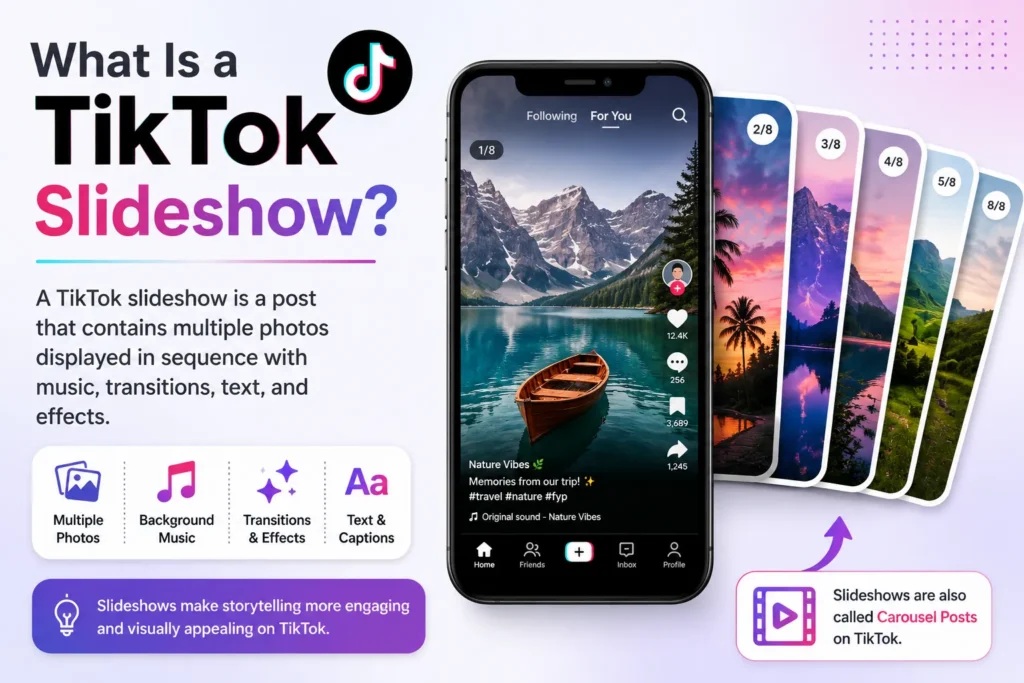
A TikTok slideshow is a post that shows multiple photos one after another, instead of a traditional video. These posts usually include background music, text, transitions, and effects that make the whole thing feel like a mini video.
That’s why so many people prefer downloading TikTok slideshows as a single MP4 video rather than saving each photo one by one.
Why Download TikTok Slideshows as MP4?
Saving a TikTok slideshow as an MP4 video just makes life easier. Instead of opening multiple image files one by one, you get a single clean video that plays the whole slideshow in the right order with the original audio included.
You can watch it offline anytime, share it with friends or family across any platform, and play it on your phone, laptop, tablet, or smart TV without any compatibility issues. Managing one video file is always simpler than keeping track of dozens of separate images.
How to Download a TikTok Slideshow as MP4?
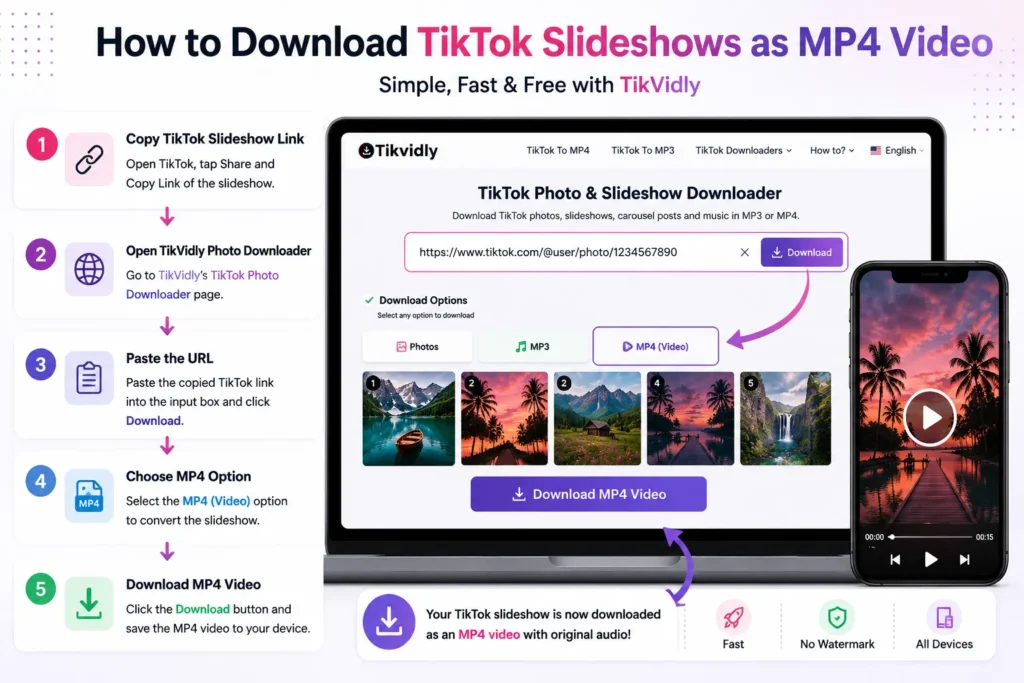
How to download TikTok slideshows as MP4 video is actually very simple and takes only a few seconds, even if you have never used a TikTok downloader before.
Step 1 — Copy the TikTok link
Open TikTok, find the slideshow you want to save, tap the Share button, and select “Copy Link.”
Step 2 — Go to TikVidly
TikVidly is a free online TikTok photo downloader that works with slideshows, carousel posts, and photo collections. No account or sign-up needed.
Step 3 — Paste the link
Paste the link into TikVidly’s input box. The tool will automatically read the slideshow and prepare your download options.
Step 4 — Choose the MP4 option
Once it’s done processing, select the MP4 download option. This combines all the slideshow photos and the original audio into one single video file.
Step 5 — Hit download
Click the download button and save the file to your device. That’s it.
Just Want the Music? No Problem
Sometimes you don’t need the whole slideshow you just love the background song. TikVidly’s TikTok MP3 indirici lets you save the slideshow audio separately as an MP3 file. It’s perfect if you want to listen to a track offline or use it for your own projects.
Want Individual Photos Instead?
Not everyone needs the full video. If you only want specific photos from a TikTok carousel post, TikVidly lets you download each image separately in HD quality, without any watermark. This is especially useful for designers, marketers, and content creators who need clean images to work with.
Benefits of Using TikVidly to Download TikTok Slideshows
There are many TikTok downloaders available online, but most of them don’t support TikTok slideshow conversion. TikVidly is different. It’s built specifically for slideshows, carousel posts, and photo collections not just regular videos.
You can download individual photos from any TikTok slideshow without losing image quality. If you only want the music, you can extract the original slideshow soundtrack and save it as an MP3.
And if you want the full experience, you can convert the entire TikTok slideshow to MP4 with the original audio included. You can also use our TikTok'tan MP4'e Dönüştürücü to save TikTok content in a widely supported video format.
On top of that, all downloads are watermark-free, so you get clean files ready to use. There’s no registration or account creation required just paste the link and download. Processing is fast too, usually done within seconds. TikVidly works on all major devices including Android, iPhone, iPad, Windows PC, Mac, and Linux, so no matter what you’re using, it just works.
Is Downloading TikTok Slideshows Legal?
Downloading publicly available TikTok content for personal use is generally considered acceptable. That said, always respect the creator’s work. Don’t claim someone else’s slideshow as your own, don’t use it commercially without permission, and give credit where it’s due. Responsible downloading supports the creators who make this content.
Troubleshooting Common Issues
If a slideshow isn’t loading, there are a few things to check before trying again.
1. Make Sure Your TikTok Account is Public:
Private accounts cannot be accessed by any downloader tool, so your profile visibility needs to be public for the download to work.
2. Check That the Slideshow or Photo URL is Public and Not Deleted:
Even on a public account, individual posts can be set to private or may have been deleted by the creator. If the post has been removed or restricted, it won’t be downloadable.
3. Make Sure the Link is Correct and Complete:
An incomplete or broken URL will fail to load. Always copy the link directly from TikTok’s Share button to avoid any errors.
If everything looks fine but the download button still isn’t showing up, simply refresh the page and paste the link again. That usually fixes the issue.
Sıkça Sorulan Sorular
How do I download TikTok slideshows as MP4 video?
To download TikTok slideshows as MP4 video, copy the TikTok link, paste it into TikVidly, and select the MP4 download option.
Can I convert TikTok slideshows to MP4?
Yes, absolutely. TikVidly lets you convert any TikTok slideshow into an MP4 video with the original audio included. Just paste the link and select the MP4 download option.
Can I download TikTok slideshow music separately?
Yes. If you only want the background music from a TikTok slideshow, you can use TikVidly’s TikTok MP3 downloader to save the audio as a separate MP3 file.
Can I download all photos from a TikTok slideshow?
Yes. Every image in a TikTok carousel post or slideshow can be downloaded individually in HD quality, without any watermark.
Does TikVidly work on iPhone?
Yes. TikVidly works smoothly on iPhone, iPad, Android devices, Windows PCs, and Macs. No app download is needed it runs directly in your browser.
Is TikVidly free?
Yes, completely free. There’s no subscription, no hidden charges, and no registration required. All TikTok slideshow downloads are available at no cost.
Final Thoughts
If you’re wondering how to download TikTok slideshows as MP4 video, the process is easier than most people think. Whether you want to save memories, collect ideas, or just watch something offline, converting a slideshow into an MP4 video is the easiest and most convenient option.
With TikVidly, you can TikTok Fotoğraflarını ve Slayt Gösterilerini İndirin, save slideshow audio as MP3, or convert a full TikTok slideshow to MP4 all for free, with no watermark, and no sign-up required. The whole thing is done in seconds, on any device.
If you regularly save TikTok carousel posts, having a reliable slideshow-to-MP4 downloader on hand will save you a lot of time.