
How to Download TikTok Audio as MP3
If you’re looking for an easy way to download TikTok audio as MP3, you’ve come to the right place. TikTok has become one of the biggest platforms for discovering trending songs, viral sounds, motivational speeches, podcasts, and funny audio clips. Sometimes you don’t need the entire video. You only want the sound.
With TikVidly’s TikTok MP3 Downloader, you can extract audio from TikTok videos and save it as a high-quality MP3 file in just a few seconds. Everything works directly from your browser, with no app to install, no registration required, and completely free.
Many users already use our TikTok Video Downloader to save videos without watermark, but downloading audio is just as simple. Whether you’re building a playlist, collecting trending sounds, or saving your favorite TikTok audio for offline listening, TikVidly makes the process fast and effortless.
What Is TikTok Audio?
TikTok audio refers to the sound used in a TikTok video. This may include music, voice recordings, podcasts, sound effects, motivational speeches, comedy clips, or original creator audio.
Many TikTok videos become popular because of their background music rather than the video itself. As a result, users often want to save the audio separately instead of downloading the complete video.
Downloading audio as MP3 gives you much more flexibility. You can listen offline, organize your favorite sounds into playlists, use them for personal reference, or simply enjoy the music whenever you want.
Why Download TikTok Audio as MP3?
There are many reasons why people prefer downloading TikTok audio instead of the complete video.
One of the biggest reasons is convenience. MP3 files are much smaller than videos, making them easier to store on your phone, tablet, or computer. They also work with almost every music player available today.
Many users enjoy listening to trending TikTok songs during travel, workouts, or while studying. Others save motivational speeches, educational clips, language lessons, cooking instructions, or relaxing background sounds for offline use.
Downloading TikTok audio also helps when you have a slow internet connection. Instead of streaming the same video repeatedly, you can simply play the MP3 file anytime without using additional mobile data.
How to Download TikTok Audio as MP3
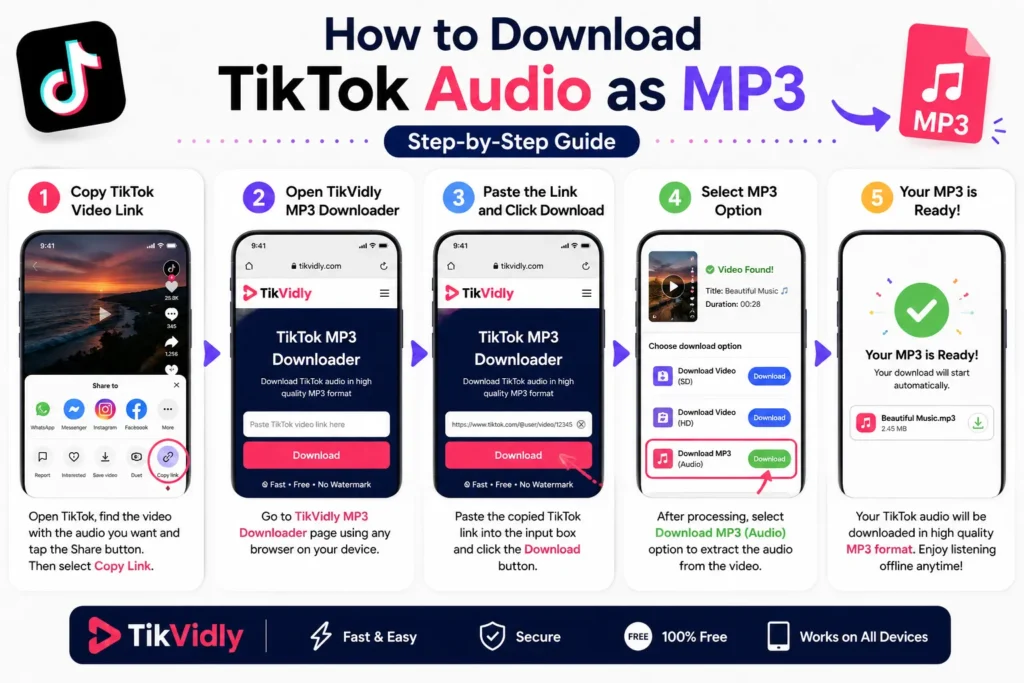
Downloading TikTok audio is quick and straightforward with TikVidly.
1. Copy the TikTok Video Link
Open TikTok and find the video containing the audio you want to save. Tap the Share button and choose Copy Link.
2. Open TikVidly
Visit the TikTok MP3 Downloader on TikVidly using any modern browser. The tool works perfectly on Android, iPhone, Windows, Mac, Linux, and tablets.
3. Paste the Link
Paste the copied TikTok URL into the download box and wait a few seconds while TikVidly processes the video.
4. Select MP3
Once the download options appear, choose the Download MP3 option. TikVidly automatically extracts the audio from the video while maintaining excellent sound quality.
5. Save the File
Your MP3 file will be downloaded directly to your device. You can now listen to it offline whenever you want.
Can You Download TikTok Music Without Installing an App?
Yes. One of the biggest advantages of TikVidly is that everything works online. You don’t need to install an application, browser extension, or additional software. Simply open TikVidly in your browser, paste the TikTok link, and download the audio instantly. Because everything happens online, the downloader works across almost every modern device without requiring any technical setup.
Why Choose TikVidly TikTok MP3 Downloader?
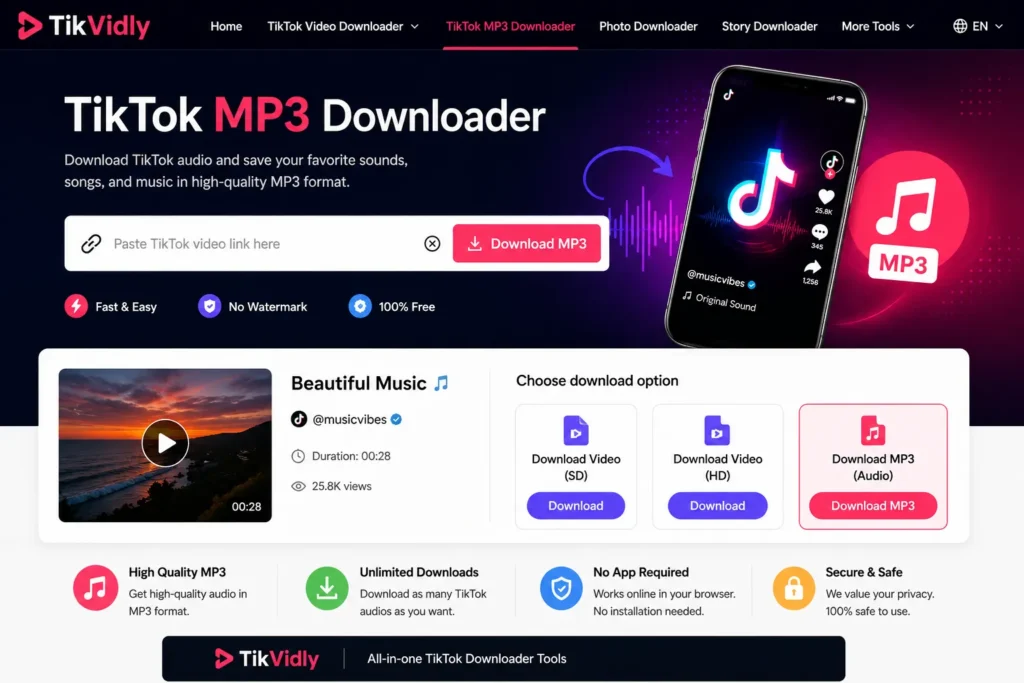
There are plenty of TikTok MP3 downloaders available online, but not all of them offer fast downloads, high-quality audio, or a clean user experience. Some require registration, while others limit download speed or display unnecessary advertisements before allowing you to save the audio.
TikVidly is designed to keep the process simple. It extracts audio quickly while maintaining excellent sound quality, allowing you to save your favorite TikTok songs, speeches, podcasts, and original sounds without unnecessary steps.
In addition to downloading TikTok audio as MP3, TikVidly also lets you save TikTok videos without watermark, download TikTok photos, save TikTok stories, and even convert TikTok photo slideshows into MP4 videos with original audio. Everything works from a single platform, making it a complete solution for downloading TikTok content.
If you also want to save the complete video instead of only the audio, you can use our TikTok Video Downloader to download videos without watermark in high-quality MP4 format.
Likewise, if you’re interested in saving image posts, check out our guide on How to Download TikTok Photos Without Watermark, or learn How to Download TikTok Slideshows as MP4 Video to convert photo carousels into videos with music.
Supported Devices
TikVidly works on virtually every modern device and operating system. Since the tool runs entirely in your browser, there’s nothing to install and no setup required. Whether you’re on a smartphone, tablet, laptop, or desktop, the process is exactly the same. Just paste the link and download.
Android
Open Chrome or any modern Android browser, paste your TikTok link, and download. Your MP3 file saves directly to your Downloads folder, ready to play offline anytime.
iPhone & iPad
TikVidly works seamlessly on Safari and other iOS browsers. No app download, no account needed. Just paste the link and save your TikTok audio in seconds.
Windows PC
Use Chrome, Edge, Firefox, or any modern browser to download TikTok audio as a high-quality MP3 file, ready for offline listening whenever you need it.
Mac
Mac users can extract TikTok audio just as easily using Safari, Chrome, or Firefox no additional software or plugins required.
Linux
TikVidly works on Linux too. Any modern web browser gives you the same fast, reliable MP3 downloads without any extra configuration.
Benefits of Saving TikTok Audio as MP3
Saving TikTok audio as an MP3 file gives you more flexibility than streaming it every time. Whether it’s a trending song, motivational speech, podcast-style clip, or relaxing background music, you can enjoy it anytime without opening the TikTok app or using an internet connection.
MP3 files are also much smaller than videos, so they’re easier to store, share, and play across devices. Whether you’re commuting, working out, traveling, or just want background music without distractions, your saved TikTok audio is always ready to go.
Common Problems and Solutions
The TikTok Link Doesn’t Work
Make sure you’ve copied the full and complete TikTok video URL directly from the app’s Share button. Also check that the video is set to public private videos cannot be downloaded.
MP3 Option Is Missing
Refresh the page and paste the link again. Some videos may need a few extra seconds to process before all download options appear.
Download Failed
Check your internet connection and make sure the TikTok video hasn’t been deleted or made private since you copied the link.
Audio Quality Seems Low
TikVidly always extracts the highest quality audio available from the original TikTok video. If the audio sounds low quality, it’s because the original upload by the creator was recorded or compressed at a lower quality.
Frequently Asked Questions
Can I download TikTok audio as MP3 for free?
Yes, completely free. TikVidly’s TikTok MP3 Downloader lets you save TikTok audio without any subscription, hidden charges, or registration required.
Does TikVidly work on iPhone?
Yes. TikVidly works on iPhone, iPad, Android devices, Windows PCs, MacBooks, and Linux systems, all from your browser, no app needed.
Can I download audio from a private TikTok video?
No. Private TikTok videos cannot be accessed by any downloader tool. The video must be set to public for the download to work.
What audio quality does TikVidly download?
TikVidly always extracts the highest quality audio available from the original TikTok video. Audio quality depends on what the creator originally uploaded.
Can I download TikTok slideshow audio as MP3?
Yes. If you want to save the background music from a TikTok slideshow, TikVidly’s MP3 downloader works for slideshow audio too.
Is there a limit on how many TikTok MP3s I can download?
No. There are no download limits, you can save as many TikTok audio files as you need, completely free.
Final Thoughts
Saving TikTok audio as MP3 has never been easier. Just copy the TikTok link, paste it into TikVidly’s TikTok MP3 Downloader, and your file is ready in seconds no installation, no registration, and no subscription required.
Whether you’re on Android, iPhone, Windows, Mac, or Linux, TikVidly gives you a fast, free, and reliable way to convert any TikTok video into a high-quality MP3 file and enjoy it offline, anytime.