
How to Download TikTok Videos on iPhone Without App
If you’ve ever tried saving a TikTok video on your iPhone, you already know it’s not as straightforward as it should be. Some methods ask you to install third-party apps, others leave a watermark on your video, and a few just don’t work at all.
The good news is that you don’t need to install any app at all.
With TikVidly’s TikTok Video Downloader, you can save TikTok videos directly from Safari or any browser on your iPhone. No installation, no account, no complicated steps. Just copy the link, paste it, and your video is saved in seconds.
Why iPhone Users Prefer an Online TikTok Downloader
A lot of iPhone users assume they need to install something before they can save a TikTok video. But honestly, an online downloader is the better option in almost every case.
Browser-based tools like TikVidly don’t take up storage space, don’t need updates, and work instantly from any browser. Whether you’re on Safari, Chrome, or Firefox, you can open TikVidly and download a video within seconds without switching between multiple apps.
For users who care about privacy, there’s another big advantage — no registration, no personal information required, nothing stored on your device except the video itself.
Can You Really Download TikTok Videos on iPhone Without an App?
Yes, absolutely. Apple has made browser-based file downloads much smoother over the past few years, which means you can now save videos directly through Safari without installing anything extra.
All you need is your iPhone, a browser, the TikTok video link, and TikVidly. That’s it.
How to Download TikTok Videos on iPhone Without App
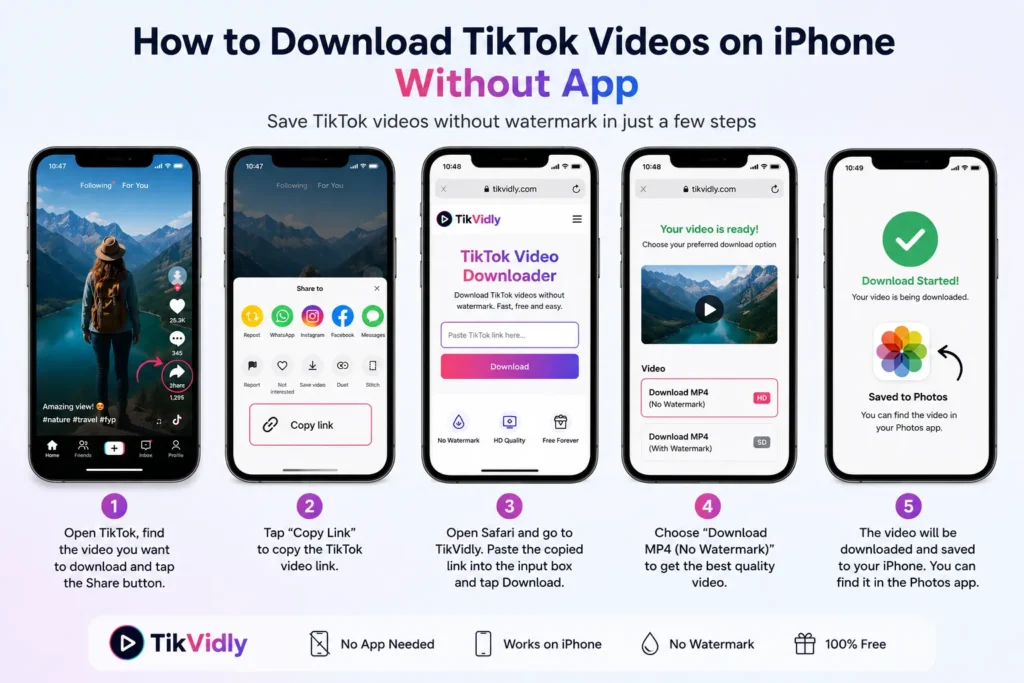
The whole process takes less than a minute.
Step 1: Copy the TikTok Video Link
Open TikTok, find the video you want to save, tap the Share button, and select Copy Link.
Step 2: Open TikVidly in Your Browser
Go to TikVidly’s TikTok Video Downloader in Safari or any browser on your iPhone. No sign-in needed.
Step 3: Paste the Link
Paste the copied TikTok URL into the input box and wait a few seconds while TikVidly processes the video.
Step 4: Choose Your Download Option
Select the MP4 without watermark option to save the best quality version available.
Step 5: Save the Video
The video will download directly to your iPhone. Once it’s saved, you can watch it anytime offline without opening TikTok.
Where Do Downloaded TikTok Videos Go on iPhone?
This is something a lot of people wonder about after their first download.
Depending on your browser and iPhone settings, the video will either go into the Downloads folder inside your Files app, or directly into your Photos app. If it lands in Downloads, just tap Share and choose Save Video to move it to your Photos library. After that, it’s easy to find, edit, and share whenever you want.
Why TikVidly Works Better Than Other Downloaders on iPhone
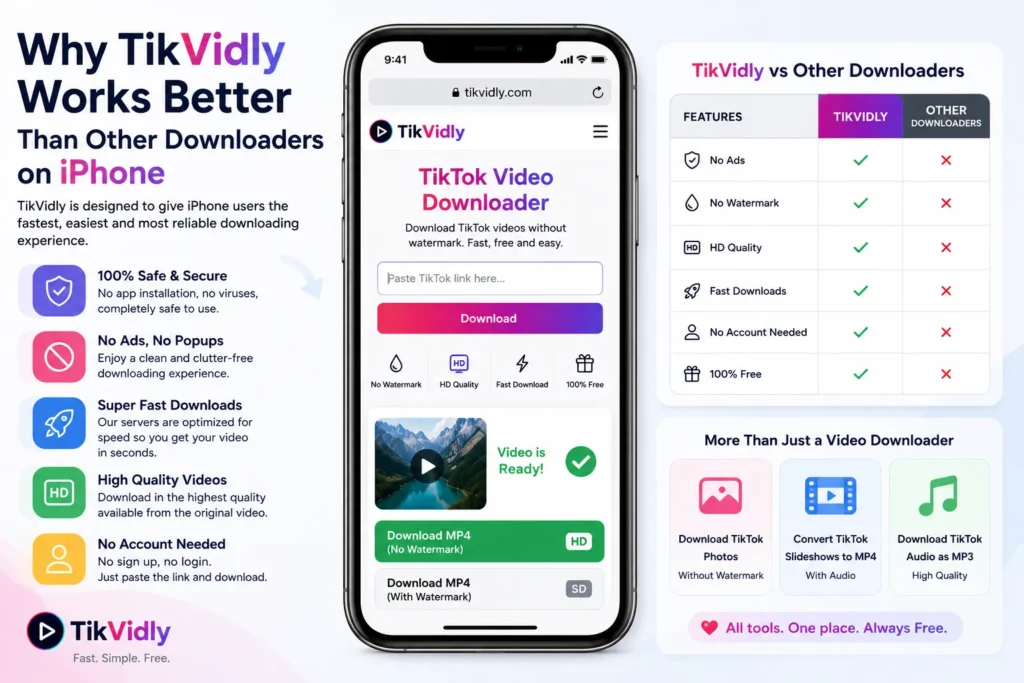
There are a lot of TikTok downloaders out there, but most of them are either too slow, full of ads, or don’t work properly on iPhone. TikVidly is built to work cleanly in any browser without any of that friction.
You get watermark-free downloads, the highest quality available from the original video, and a simple process that works the same way on iPhone, iPad, and every other device. No account creation, no hidden steps, completely free.
If you ever need to go beyond just videos, TikVidly also lets you download TikTok photos without watermark, convert TikTok slideshows to MP4, and save TikTok audio as MP3 — all from the same place.
Which iPhones and iPads Does TikVidly Support?
Since TikVidly runs entirely in your browser, it works on virtually every iPhone and iPad that supports a modern browser. It doesn’t matter if you have an older model or the latest one — as long as Safari or Chrome runs on it, TikVidly will work.
The same applies to iPad. The download process is identical — paste the link and save. No compatibility issues to worry about.
Can You Download Private TikTok Videos?
No. TikVidly only works with publicly available TikTok videos. If a creator has set their account or a specific video to private, it cannot be downloaded through any tool.
If you’re trying to save your own private video, temporarily set it to public, download it, then switch it back to private.
Tips for Faster Downloads on iPhone
A few small habits make a big difference. Always copy the link directly from the original TikTok post — links shared through other apps are sometimes incomplete and can cause errors. A stable Wi-Fi connection also helps videos process and download faster. And if you’re downloading multiple videos, finish one before starting the next to avoid any interruptions.
Common Problems and Solutions
The Video Is Not Downloading
Check that you’ve copied the full TikTok video link from the Share button. If the link is incomplete or the video has been deleted, the download won’t start.
Safari Is Not Saving the Video
Look inside the Downloads folder in your Files app. If it’s not there, refresh the page and try again.
The Video Is Private
Only public TikTok videos can be downloaded. Private or restricted content is not supported by any downloader.
Download Is Slow
A weak internet connection or temporary server load can slow things down. Give it a moment and try again.
The Link Is Not Working
Make sure you copied a direct TikTok video URL. Profile links or search page URLs won’t work — you need the link from the Share button on the actual video.
Frequently Asked Questions
Can I download TikTok videos in HD on iPhone?
Yes. If the original TikTok video was uploaded in HD, TikVidly lets you download it in the highest quality available without watermark.
Can I download TikTok videos on iPhone for free?
Yes, completely free. TikVidly lets you save public TikTok videos without any charges or registration.
Do I need to install an app?
No. Everything works directly in Safari or any modern browser on your iPhone.
Can I download TikTok videos without watermark on iPhone?
Yes. TikVidly gives you clean, watermark-free downloads in the best quality available from the original video.
Does TikVidly work on all iPhones?
Yes. TikVidly works on virtually all modern iPhones and iPads through any current web browser.
Where are downloaded videos saved on iPhone?
Videos are saved either in the Downloads folder in your Files app or directly in your Photos app, depending on your browser settings.
Is TikVidly safe to use on iPhone?
Yes. TikVidly is a browser-based tool that requires no installation, no login, and no access to your personal information.
Final Thoughts
Saving TikTok videos on an iPhone without installing any app is genuinely simple with TikVidly. Copy the link, paste it, pick your download option, and the video is on your device in seconds — no watermark, no account needed, completely free.
Whether you’re saving tutorials, travel content, recipes, or your own videos, TikVidly works the same clean way every time. If you also want to download TikTok audio, save TikTok photos, or convert TikTok slideshows into MP4 videos, TikVidly gives you everything you need in one place.