
TikTok Video Not Downloading? 5 Easy Fixes
Have you ever come across a TikTok video you really wanted to save? You copy the link, paste it into a downloader, hit the button, and nothing happens. No download, no error message, just silence. Or maybe an error pops up that tells you absolutely nothing useful.
It happens to a lot of people, and the good news is it’s almost always fixable in under a minute.
Most TikTok download failures come down to one of a few simple causes, a private video, a wrong link, a deleted post, or a temporary connection issue. Once you know what’s actually causing the problem, fixing it takes no time at all.
In this guide, you’ll learn exactly why TikTok videos fail to download and how to fix each problem quickly using TikVidly’s TikTok Video Downloader.
Why Do TikTok Videos Fail to Download?
Before jumping straight to fixes, it helps to understand what’s actually going wrong. Most of the time, the problem isn’t the downloader, it’s one of these three things.
1. The Video Is Private
This is the most common reason and the one most people overlook. If a creator has set their account or a specific video to private, no downloader in the world can access it. It’s not a technical glitch, the video is simply not publicly available.
2. The Video Has Been Deleted
Sometimes you copy a link, but by the time you try to download it, the creator has already removed the video. When that happens, the video no longer exists on TikTok, so there’s nothing to retrieve. If opening the link shows “video unavailable,” this is most likely the reason.
3. You’re Using the Wrong Link
A lot of users accidentally copy a profile link instead of a direct video link. A downloader needs the URL of a specific video, not a profile page or search result. If you paste anything other than a direct video link, the download will fail every time.
How to Fix TikTok Video Not Downloading
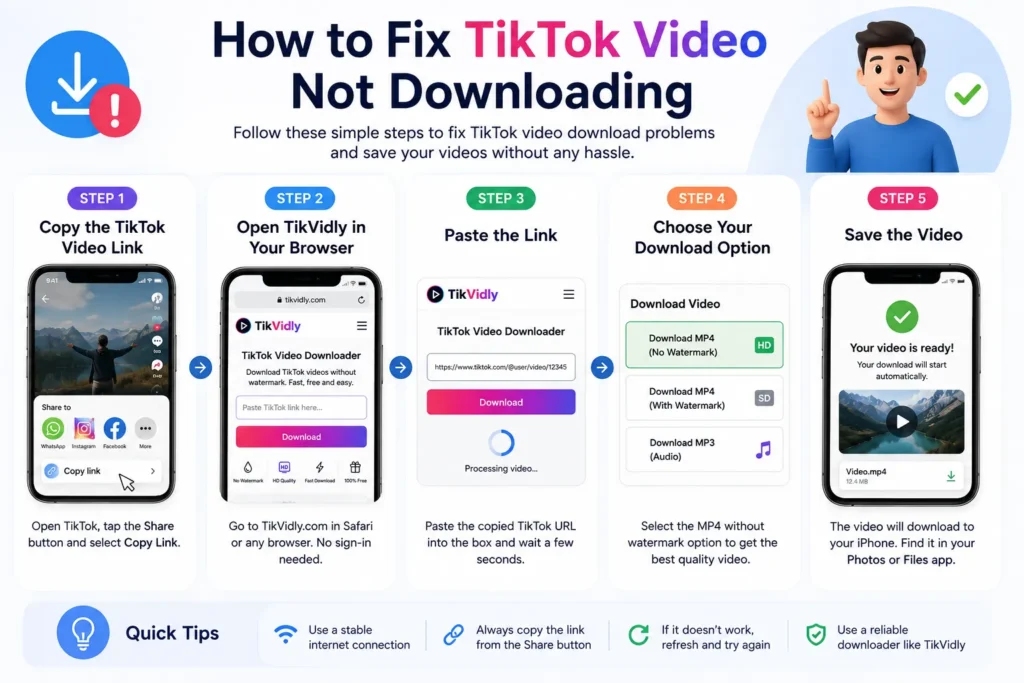
Good news, most of these problems have a simple fix. Work through these one by one and your download will most likely be working again within a few minutes.
Copy the Link Again
This sounds too simple to matter, but it fixes the problem more often than you’d expect. Old, incomplete, or accidentally copied profile links are one of the most common reasons downloads fail. Open TikTok, find the video, tap the Share button, and select Copy Link fresh.
Make Sure the Video Is Public
Paste the copied link directly into your browser and see if the video opens normally. If TikTok says the video is unavailable or restricted, the downloader won’t be able to access it either. There’s no workaround for private content, it simply cannot be downloaded.
Try Again After a Few Minutes
Sometimes TikTok temporarily updates its servers or experiences short outages. If everything looks correct but the download still isn’t working, wait a few minutes and try again. This fixes more problems than people realize.
Check Your Internet Connection
A weak or unstable connection can interrupt the download mid-process or stop it from starting at all. Switch to a stronger Wi-Fi network or a better mobile data signal before trying again.
Clear Your Browser Cache
Sometimes your browser holds onto outdated data that stops pages from loading correctly. Clearing your cache or simply opening TikVidly in a private or incognito window often solves unexpected download errors without any other changes needed.
Check Your Browser Download Permissions
Some browsers block file downloads if certain permissions have been turned off. Make sure your browser allows downloads before trying again. This is especially worth checking if downloads work on other websites but not here.
Try a Different Network
If you’re on an office, school, or public Wi-Fi network, the network itself may be blocking access to certain websites or file downloads. Switching to your mobile data connection will usually solve this immediately.
Why the Downloader You Use Actually Matters
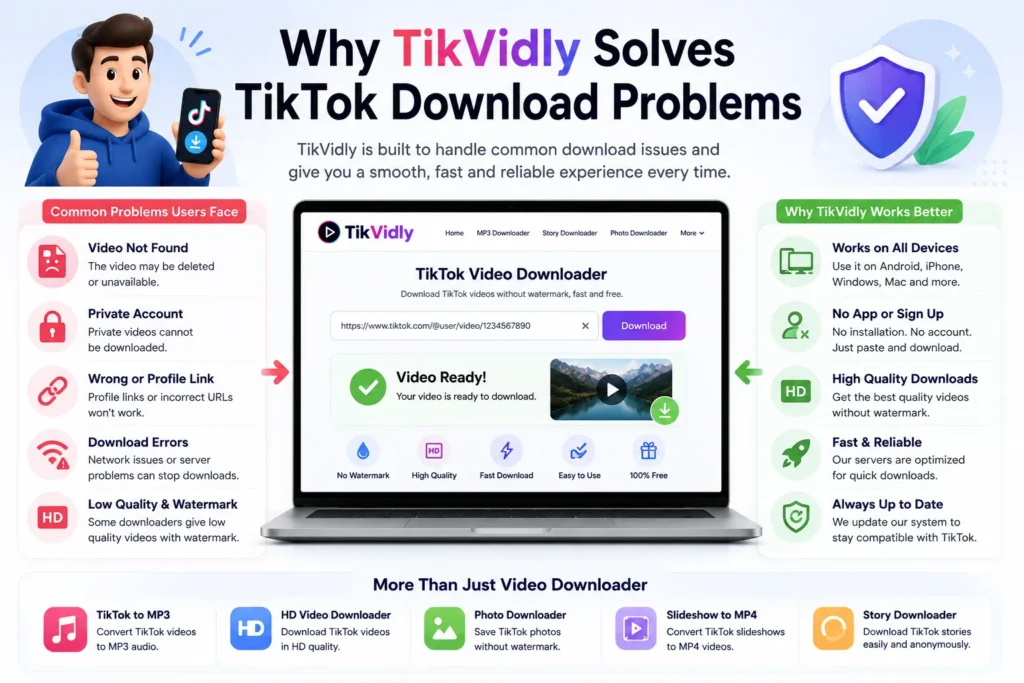
Not all TikTok downloaders work the same way. Some are slow, some are buried under so many ads that finding the actual download button feels like a puzzle, and others simply stop working every time TikTok makes a small update.
A good downloader quietly handles all the technical side so you don’t have to think about it. It reads the link, finds the best available quality, and gives you a clean download without unnecessary steps or distractions.
TikVidly works directly in your browser, no software to install, no account to create, no sign-in required. It works on Android, iPhone, Windows, Mac, and practically every other device. Just paste the link and download.
And if you ever need more than just video downloads, TikVidly also lets you save TikTok photos without watermark, convert TikTok slideshows to MP4, extract TikTok audio as MP3, and download TikTok stories, all from the same place.
Tips to Avoid TikTok Download Errors
A few simple habits will save you from running into these problems in the future.
- Always copy the video link directly from the TikTok app using the Share button. Links shared through WhatsApp, Instagram, or other apps are sometimes incomplete and cause errors.
- Before downloading, quickly check that the video is still publicly available. If the creator has deleted it or changed the privacy settings since you copied the link, the download won’t work.
- Use a stable Wi-Fi connection when downloading, especially for longer or HD quality videos. A weak connection mid-download can corrupt the file or stop it entirely.
- If you’re downloading multiple videos, finish one before starting the next. Running several downloads at the same time can slow things down and sometimes cause individual downloads to fail.
- Stick to a trusted downloader that is regularly updated. TikTok frequently makes changes to how its links work, and outdated downloaders stop working as a result.
Common Problems and Solutions
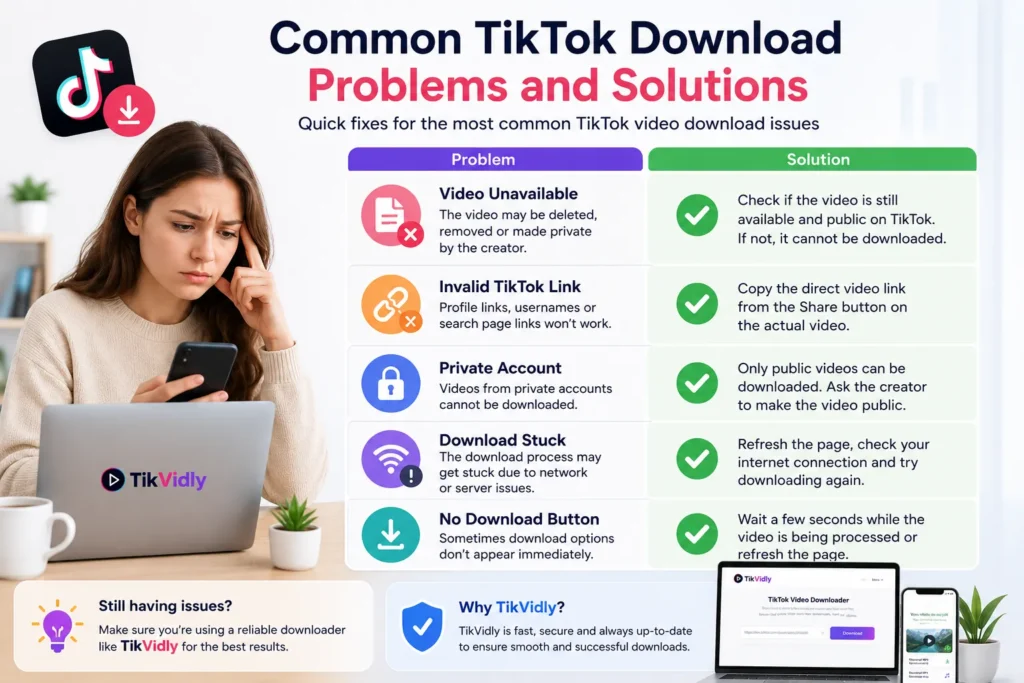
The Download Starts But the File Won’t Play
This usually happens when the internet connection dropped mid-download and the file saved incomplete. Delete the file, make sure your connection is stable, and download it again.
The Download Button Is Not Appearing
Wait a few extra seconds after pasting the link, some videos take slightly longer to process. If it still doesn’t appear, refresh the page and paste the link again fresh.
The Video Downloads But Has No Audio
This is rare but it does happen. It usually means the original TikTok video had audio restrictions applied by the creator or TikTok itself. Try downloading again, if the audio is still missing, it wasn’t available in the original source.
Download Speed Is Very Slow
A slow connection or temporary server load can affect download speed. Switch to a stronger Wi-Fi signal or wait a few minutes and try again. Avoid downloading during peak hours if possible.
The Same Link Keeps Failing
If you’ve tried everything and the same link keeps failing, the video may have been restricted by TikTok after you copied it. Open the link in your browser to confirm the video is still accessible, then try again.
Frequently Asked Questions
Why is my TikTok video not downloading?
The most common reasons are an incorrect video link, a private account, a deleted video, or a temporary network issue. Work through the fixes in this guide one by one and the problem will most likely be solved within a few minutes.
Can I download videos from private TikTok accounts?
No. TikVidly only works with publicly available TikTok videos. Private content is restricted by TikTok itself and cannot be accessed by any downloader tool.
Why does a profile link not work?
A TikTok downloader needs a direct video link, not a profile page URL. Open the specific video, tap Share, and copy that link instead.
What if the download starts but the file is corrupted or won’t play?
This usually happens because the internet connection dropped mid-download. Delete the file, make sure your connection is stable, and try again.
Why can’t I download a TikTok Story?
If the profile doesn’t have an active public story, nothing can be downloaded. You can check this using TikVidly’s TikTok Story Downloader.
Is TikVidly free to use?
Yes, completely free. No subscription, no hidden charges, and no registration required.
Do I need to install any software?
No. Everything works directly in your browser on any device, no app, no extension, nothing to install.
Final Thoughts
TikTok download errors look more complicated than they actually are. Almost every problem comes down to one simple thing — the link, the privacy setting, or the connection. Fix that one thing and you’re done.
Next time a download fails, don’t waste time trying random solutions. Check whether the video is public, copy the link fresh from the Share button, make sure your connection is stable, and try again. That combination solves the problem the vast majority of the time.
And if you need to download TikTok photos, convert slideshows to MP4, save audio as MP3, or check for public TikTok stories, TikVidly handles all of it from one place free, no sign-up, works on any device.